Introduction
Over the past two posts (Building a Scalable Zero Trust Demo environment with Cloudflare and Terraform (Part 1) and Automating Cloudflare Zero Trust at Scale: Terraform, Multi-Cloud, and Identity (Part 2) ), we’ve explored the foundations of building a scalable Zero Trust demo environment and how to automate its deployment with Cloudflare and Terraform. In Part 1, we laid the groundwork by designing a robust, modular Zero Trust architecture. Part 2 took things further, demonstrating how to streamline and scale this setup using Infrastructure as Code principles. Now, in part 3 (final part), we will explore advanced use cases you can demonstrate with this environment.
What’s new since Part 2:
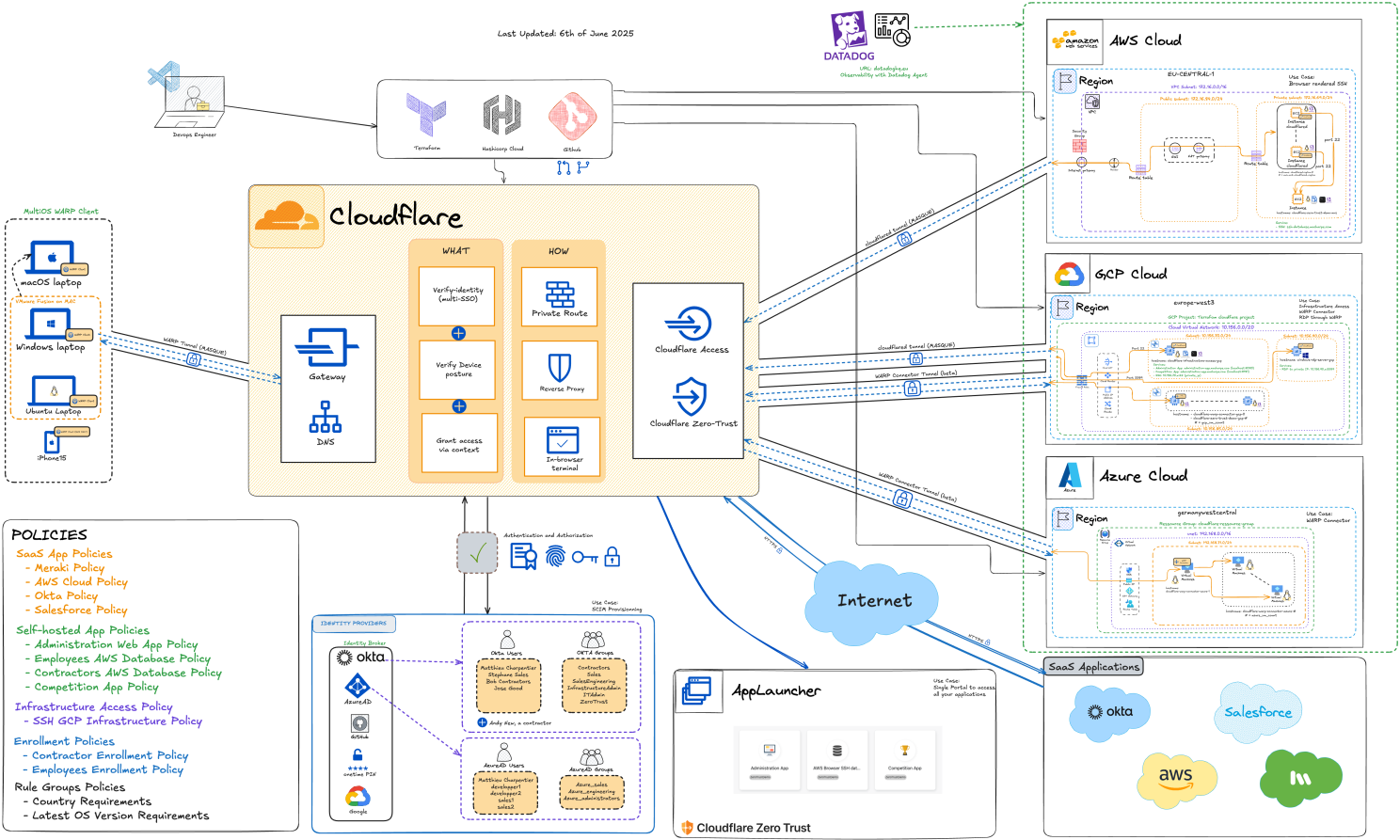
- Site to Site connectivity with WARP to WARP Client (GCP <–> Azure)
- Added an additional subnet on GCP to host the WARP VM and subsequent VMs.
- Added a Cloud Nat Gateway to GCP to avoid allocing public IPs for each VMs.
- Added a NAT Gateway on Azure (because this on September 30, 2025 and this )
- All workloads are accessible via private ip address (except the two with the WARP Connector, accessible with addresses in 100.96.0.0/12 subnet range)
- Added L3 reachability between GCP (WARP Subnet) –> AWS (ssh) and Azure (WARP Subnet) –> AWS (ssh)
- New use case added to GCP: Remote Desktop Connection (RDP) through WARP.
- On the 18th of July, 2025, All Developer Edition Orgs will be deactivated (source ) and therefore I had to refactor the OKTA part of the code for the demo to work. Hence I have decided to remove completely the Okta module to put it in a separate project.
- After some refactoring and cleanup, Terraform code is now 4400+ lines of code, 62 files and 14 directories (even if the quantity does not mean quality!) with 147 resources
Let’s dive into the updated architecture and what can be showcased with this environment.
Architecture Schema updated
PNG and SVG are available here .

Use Case 1: OKTA groups synchronization and user deprovisioning
First thing first, let us talk about authentication and authorization.
In order to synchronize your okta groups and build policies upon them as well as be able to deprovision users dynamically, you will need to use SCIM (System for Cross-domain Identity Management). This is a standard for automating the exchange of user identity information between identity domains, or IT systems
First, you need an identity provider. As you can see in the diagram, I have integrated with several common Identity Provider (IdP) such as Okta, Entra ID, Google and Github. However to keep the demo “free”, I am going to showcase the SCIM with Okta. The main reason is that SCIM is available for free on a dev tenant on Okta which does not hold true for Entra ID.
The second choice that had to be made is whether to use OpenID Connect (OIDC) or SAML as an authentication aprotocol. Both are viable options. If you are interested in more details you can go and attend the Explore Authentication and Authorization Protocols (15 min) from Okta.
Third, because the Okta Dev tenant only allows for 5 registered applications and because, when using OIDC, you need two separate app in Okta (source ), I have choosen SAML. Not to mention that, as of today, SAML remains very popular in large enterprises.
The Okta integration allows you to synchronize IdP groups and automatically deprovision users using SCIM.
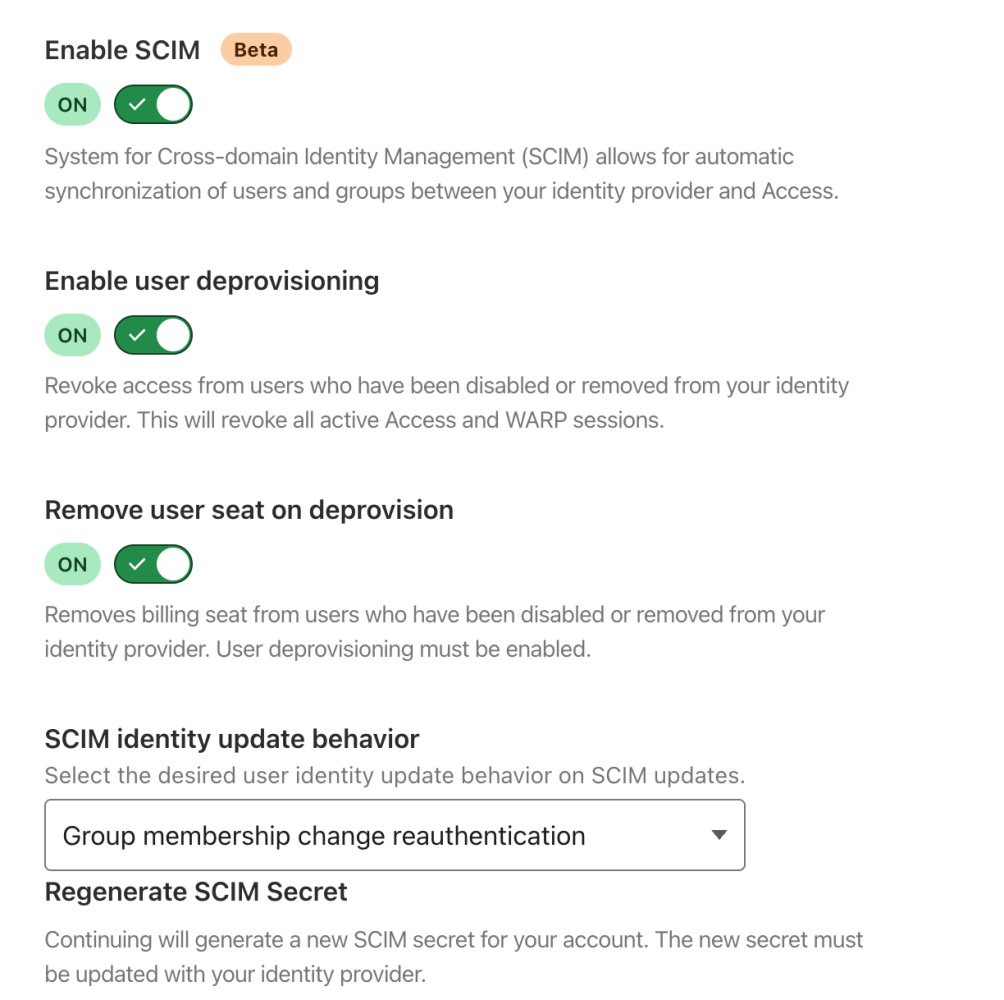
Group membership change reauthentication: Revoke a user’s active session when their group membership changes in IdP. This will invalidate all active Access sessions and prompt for reauthentication for any WARP session policies. Access will read the user’s updated group membership when they reauthenticate.
Beyond basic group synchronization, this OKTA-Cloudflare integration demonstrates true zero-trust principles in action. Unlike traditional perimeter-based security where users gain broad network access, each application request is individually evaluated against current identity state, device posture, and contextual signals. The SCIM integration ensures that privilege changes are near-instantaneous—when a developer is removed from the ‘prod-access’ group in OKTA, their production access revokes within the SCIM sync interval, typically under 5 minutes. This level of granular, real-time access control would require complex custom development with traditional infrastructure.
On a side note, not all the contextual information is checked continuously. For a thorough list, you can check out this exhaustive list provided by Cloudflare.
With this OKTA integration in place, you now have a robust foundation for dynamic access management. When an employee joins a new project team, changes roles, or leaves the organization, their group memberships in OKTA automatically propagate to Cloudflare Access within minutes. This eliminates the manual overhead of updating permissions across multiple systems and significantly reduces security risks from stale access rights. The SCIM provisioning ensures that user lifecycle management becomes seamless—no more forgotten accounts lingering with unnecessary privileges or delays in granting access to new team members.
Let see it in action:
SCIM: Provisionning and deprovisionning of a user in Okta and Cloudflare
With this robust OKTA integration establishing our identity foundation, we can now extend these same zero-trust principles beyond web applications to infrastructure access. While centralized identity management solves the “who” question, infrastructure components like servers and databases present unique challenges around the “how” of secure access. Traditional infrastructure access relies on VPNs that create broad network trust zones, but with our identity-aware foundation in place, we can now apply the same granular, contextual policies to SSH and other infrastructure protocols. Let’s see how this transforms server access from a network-level decision into an application-level one.
Use Case 2: SSH with Access for Infrastructure
Traditional SSH access creates a web of vulnerabilities: shared SSH keys that never rotate, VPN tunnels that grant excessive network access, and bastion hosts that become single points of failure and attack. Cloudflare Access transforms SSH into a web-native experience while maintaining full protocol compatibility and eliminating the need to distribute and manage SSH keys across hundreds of developers.
Here’s what makes this approach uniquely powerful:
Zero Client Installation: Developers access servers through their existing web browser, authenticated via your existing OKTA integration. No VPN clients, no SSH key distribution, no network configuration changes required—reducing onboarding time from hours to minutes.
Protocol-Level Zero Trust: Unlike VPNs that grant network-level access, Cloudflare evaluates every SSH connection request individually. Each server becomes its own protected resource with granular access policies. A developer might have access to staging servers but not production, or access might be time-bounded for specific maintenance windows.
Comprehensive Audit and Session Recording: Every SSH session flows through Cloudflare’s infrastructure, enabling complete audit logs, session recording, and real-time monitoring. Traditional SSH access often creates audit blind spots—especially when users connect directly or through shared bastion hosts.
This granular approach transforms infrastructure access from a binary network decision into nuanced, contextual authorization—as demonstrated in this policy configuration:
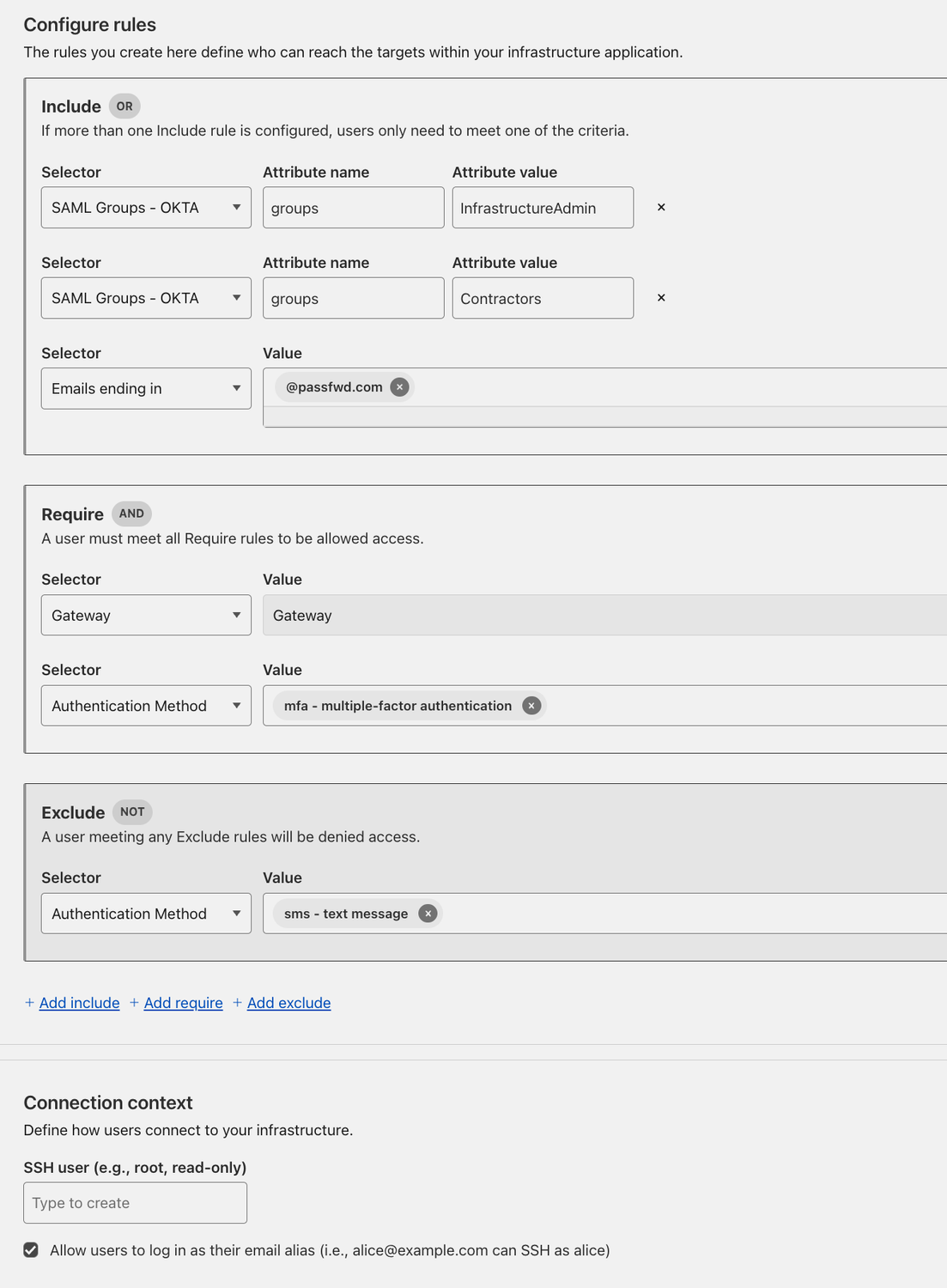
This same granular control would require complex scripting and multiple tools in traditional environments. The elegance lies in consistency—whether accessing a web application or SSH server, the same identity provider, the same policies, and the same audit trail apply. Infrastructure access becomes as controllable and observable as SaaS application access.The elegance lies in consistency—whether accessing a web application or SSH server, the same identity provider, the same policies, and the same audit trail apply. Infrastructure access becomes as controllable and observable as SaaS application access.
Below is a more in-depth diagram of how SSH connection is established under the hood.
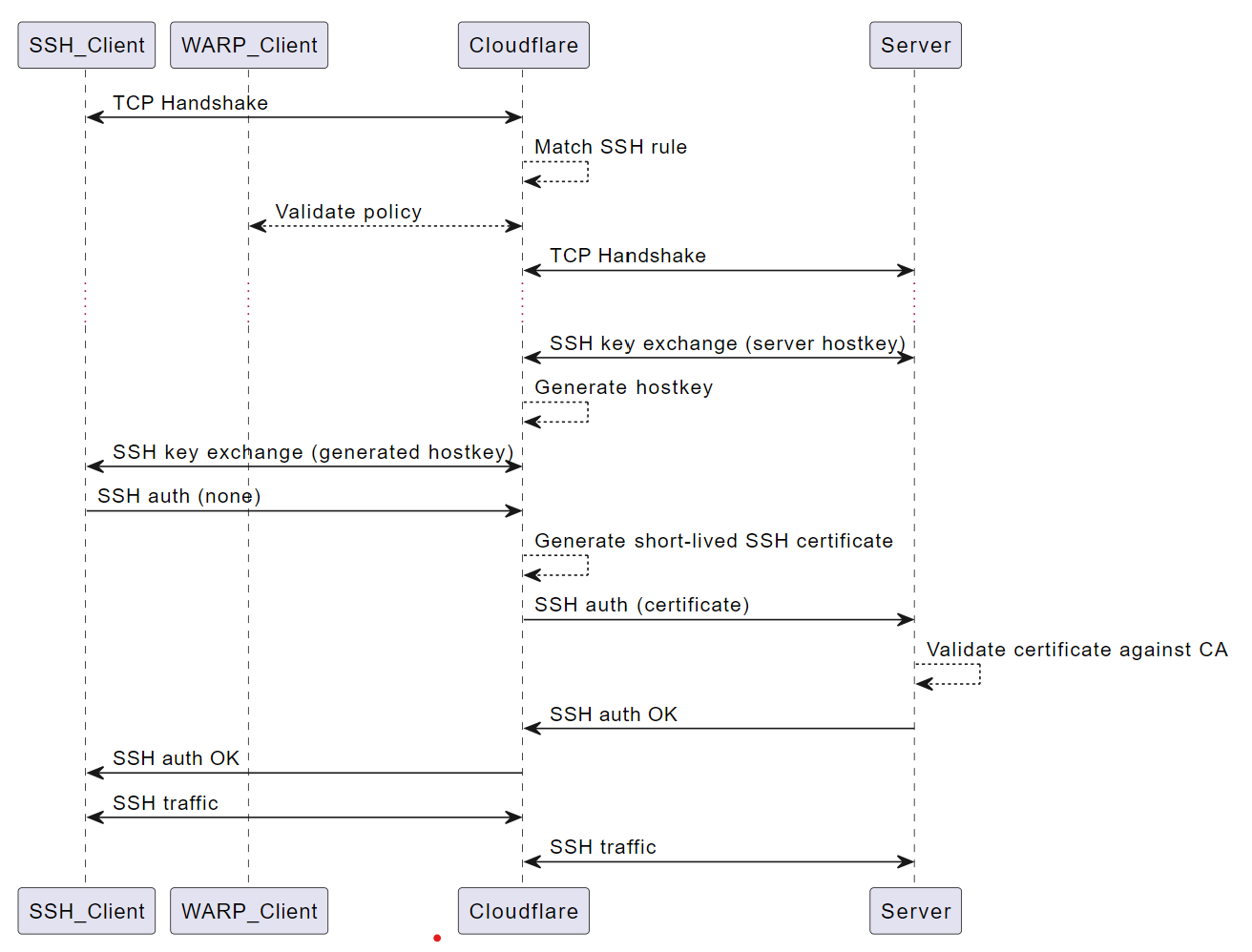
Along the setup process, one key step is the generation of the Cloudflare SSH Certificate Authority used by Cloudflare (source ). Then you will need to paste the public key onto your server so that it can validate the short-lived SSH certificate generated. This approach maintains the cryptographic integrity of SSH while eliminating long-lived credentials—each session uses a unique, short-lived certificate that automatically expires.
| |
Let us see it in action:
- Query available infrastructure: I retrieve the available targets through the web interface—no need to remember server IPs or maintain connection configs
- Seamless authentication: I login as a user listed under “Username” (matthieu) through our existing OKTA integration
- Transparent certificate management: I don’t need any certificate or private key—notice the complete absence of key management as Cloudflare handles certificate generation transparently
Example of login to SSH for Infrastructure Access App
Beyond the smooth login experience, you also get comprehensive auditability. Every session is automatically recorded and can be easily reviewed for compliance audits.
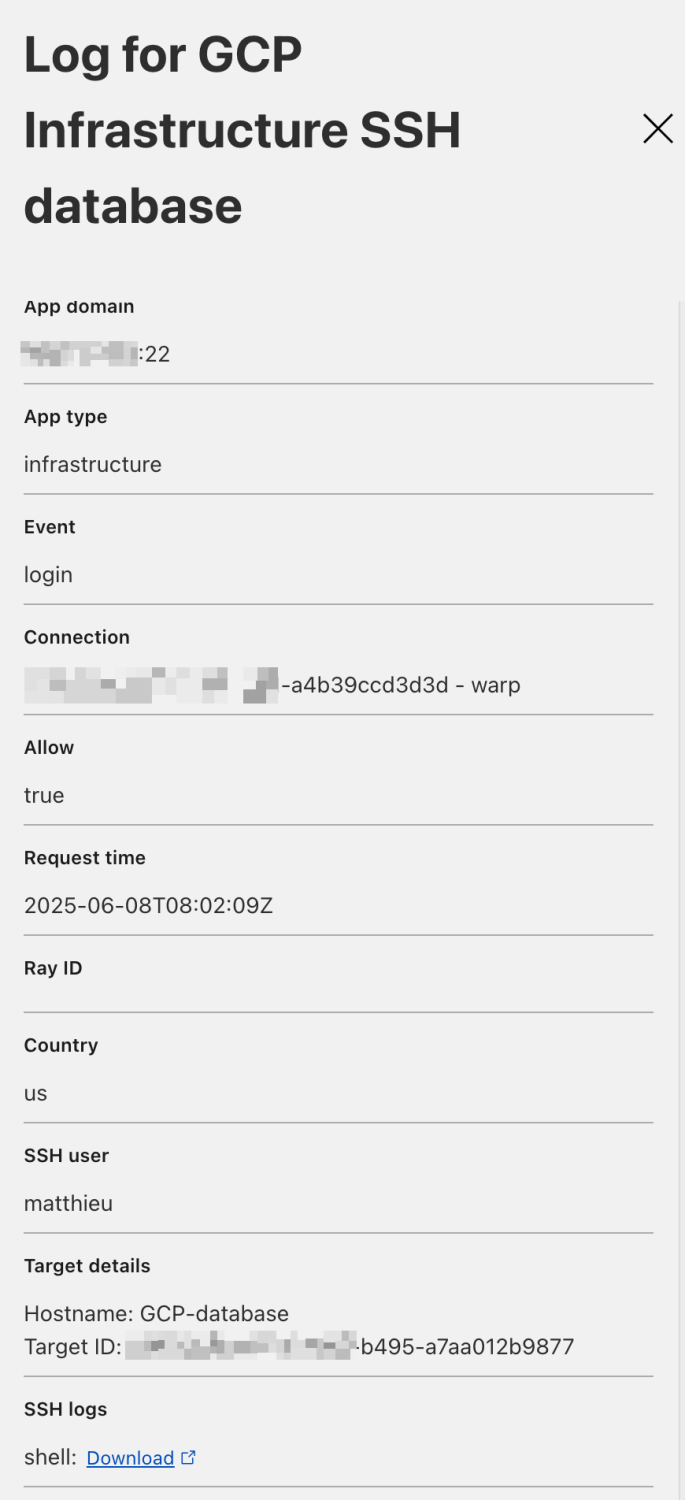
Example of session log download and decryption
Session logs can be easily decrypted and reviewed using Cloudflare’s provided tooling, making compliance audits straightforward and eliminating the operational overhead of managing separate audit solutions.
N.B.: To make it easy to decrypt the log, I have created an alias. I have pasted the code below (source: github and View SSH logs )
| |
Cloudflare’s SSH access implementation demonstrates how zero-trust principles can secure traditional infrastructure protocols, but it still requires users to have SSH clients installed and configured. What if we could eliminate even that requirement? This leads us to perhaps the most innovative capability in Cloudflare’s zero-trust arsenal: bringing the entire terminal experience directly into the browser. While our previous use case showed how to secure SSH connections, this next evolution asks a fundamental question: why should secure infrastructure access require any client software at all?
Use Case 3: Browser-rendered Terminal
This use case showcases Cloudflare’s most innovative infrastructure access capability—rendering full terminal sessions directly in the browser with zero client-side installation.
Why This Changes Everything?
Universal Access: Any device with a browser becomes a secure terminal. Developers can troubleshoot production issues from their personal laptop, a conference room computer, or even a tablet—all without compromising security posture.
Sandboxed Execution: The terminal session runs entirely within the browser sandbox, isolated from the local device. No SSH keys stored locally, no cached credentials, no residual access after the browser session ends.
Rich Protocol Support: Unlike simple web shells, this supports full terminal features—colors, cursor movement, file transfers, even curses-based applications like htop or vim work seamlessly.
Cloudflare’s Technical Innovation: This capability leverages Cloudflare’s global network and browser-rendering technology to stream terminal sessions as web content. The server never sees the client device directly—all communication flows through Cloudflare’s encrypted tunnels, with the browser handling rendering and input capture.
Real-World Scenario: During a production incident, an on-call engineer receives an alert while at dinner. Using their phone’s browser, they authenticate via OKTA (including MFA), access the affected server through Cloudflare Access, run diagnostic commands, and implement a hotfix—all without installing apps or storing credentials on their personal device.
Security Elegance: Traditional remote access creates persistent attack surfaces—VPN clients, stored keys, cached sessions. Browser-rendered terminals are ephemeral by design. When the browser tab closes, access terminates completely. No residual network connectivity, no cached credentials, no client-side artifacts.
This represents the evolution from ’trust the network’ (VPN) to ’trust the identity’ (Zero Trust) to ’trust nothing persistently’ (ephemeral access). It’s infrastructure access reimagined for the cloud-native era.
Browser rendered Terminal in Action
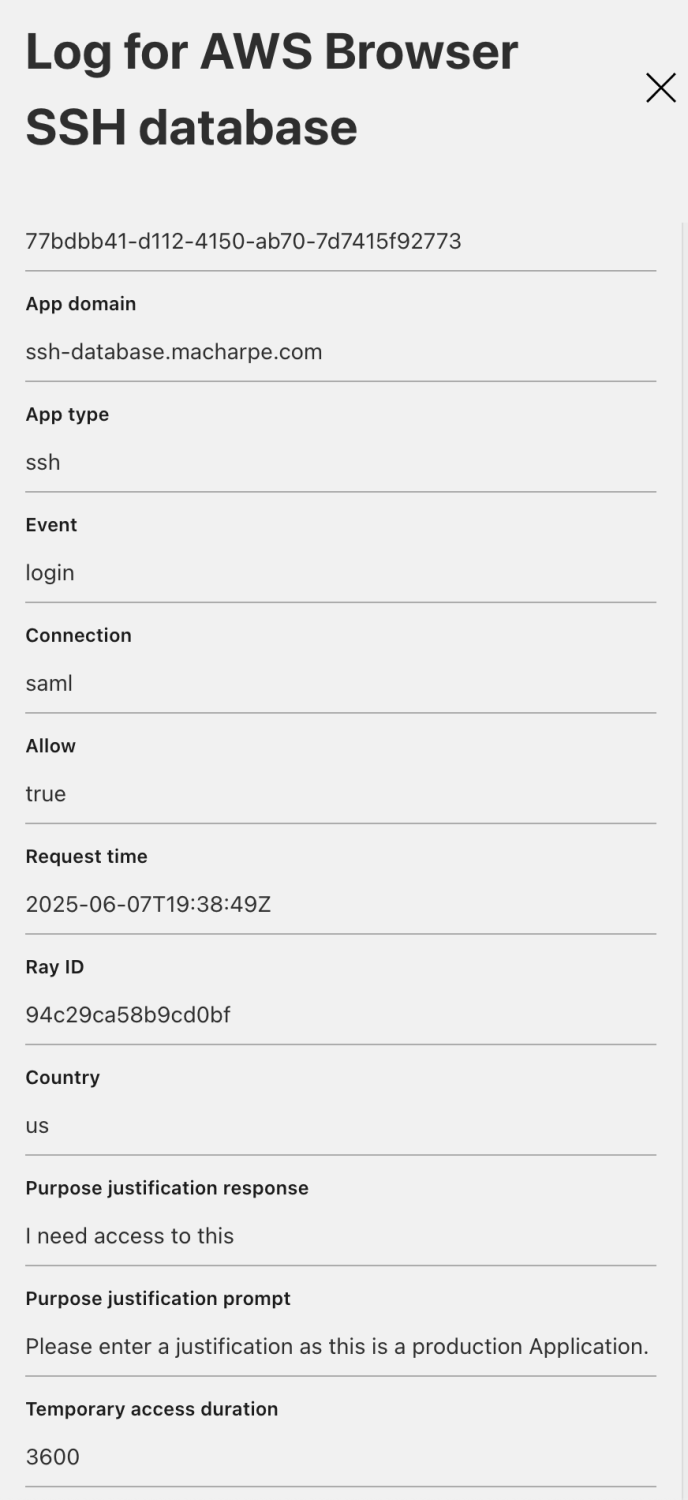
Look how smooth the experience and also how responsive the browser based terminal is. Please note that at no point in time I have entered a Private Key or username and password to SSH into the server. Everything is handled by the OKTA.
Behind the scene it uses short-lived certificates allowing certificate based authentication without having long lived keys. Below is how you define in Terraform the short-lived certificate. (documentation section 3,4,5 and 6)
| |
You can also easily audit it which is crucial for compliance purpose. Below I can also retrieve the justification from Cloudflare log.
Cloudflare’s browser-rendered terminal solution elegantly handles Linux/Unix infrastructure, but modern enterprises operate in heterogeneous environments. The reality is that Windows servers—particularly Domain Controllers—represent some of the most critical and frequently accessed infrastructure components in enterprise environments. While Cloudflare’s terminal-based solutions excel for command-line operations, Windows infrastructure often requires GUI access for administration tasks that simply can’t be accomplished through a terminal. This presents an interesting challenge: how do we apply the same zero-trust principles we’ve established for SSH to protocols like RDP that were never designed with modern security paradigms in mind? Our final use case addresses this gap by demonstrating how Cloudflare extends zero-trust protection to Windows infrastructure, maintaining our consistent security posture across the entire technology stack.
Use Case 4: RDP Connection to a Windows Domain Controller
Accessing Domain Controllers via RDP is a common enterprise requirement, but it presents significant security challenges. Domain Controllers are high-value targets that store sensitive Active Directory data, making their security paramount.
The Security Challenge
Traditional RDP implementations rely on username/password authentication and require opening ports directly to the internet. This approach is vulnerable to:
- Brute-force attacks against exposed RDP ports
- Credential stuffing attacks
- Lack of modern Zero Trust controls like MFA and device compliance
Unlike modern web applications that integrate natively with identity providers (Okta, Azure AD) and support MFA with short-lived tokens, RDP lacks built-in Zero Trust mechanisms.
Zero Trust Approach
With Cloudflare Zero Trust, we can eliminate these risks by:
- Keeping all inbound ports closed on the domain controller
- Requiring identity verification through SAML providers
- Enforcing device posture compliance
- Creating audit trails for all access attempts
Implementation Strategy
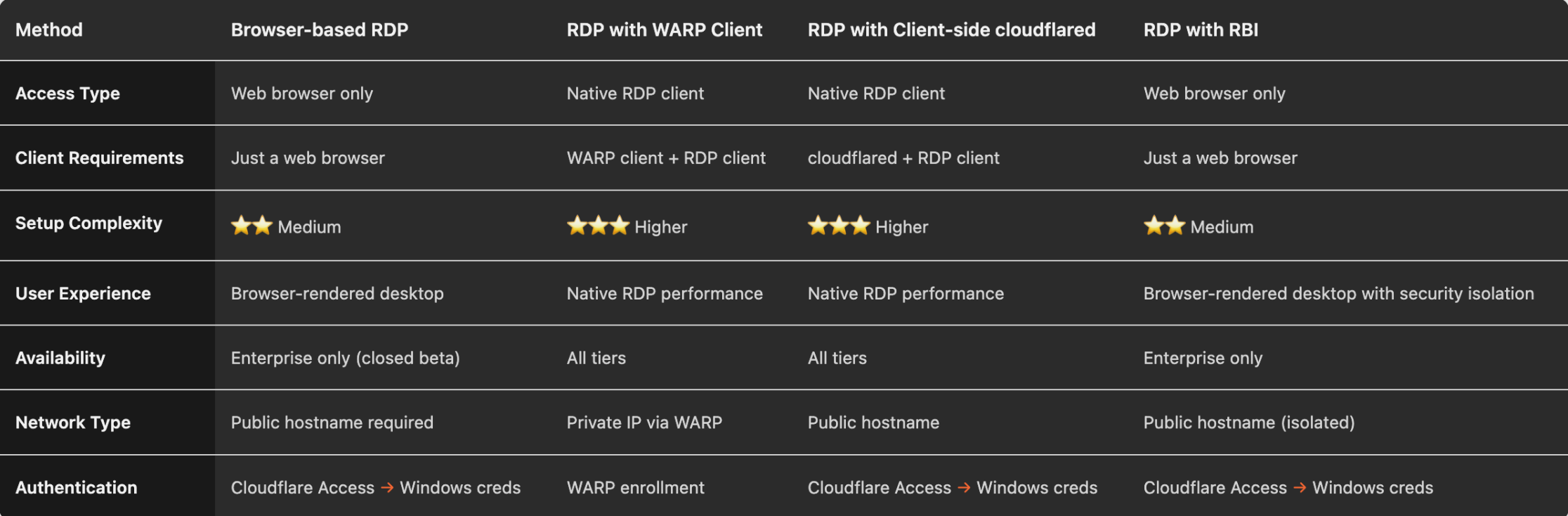
Note: While browser-based RDP or RBI (Remote Browser Isolation) would be ideal for this use case, these features are currently in Enterprise-only beta. For this demonstration using free tier capabilities, we’ll implement RDP over WARP.
Prerequisites
- WARP client installed and enrolled on admin devices
- SAML integration configured with your identity provider
- Device posture checks defined for OS compliance
- Domain controller accessible via internal network
Gateway Network Policies
We’ll implement two Gateway Network Policies in order of precedence:
- RDP IT Admin Policy - Allows access for verified IT administrators
- RDP Default Deny Policy - Blocks all other access attempts
Policy precedence ensures that the most specific rules are evaluated first, with the default deny acting as a safety net.
| |
How This Creates Zero Trust Security?
This configuration ensures that access to the domain controller requires:
- Identity verification: User must be authenticated via SAML and belong to authorized groups (ITAdmin or InfrastructureAdmin)
- Device compliance: Device must pass posture checks for latest OS versions
- Network isolation: Traffic flows through Cloudflare’s secure edge, with no exposed ports on the domain controller
- Audit trail: All access attempts are logged for security monitoring
When an unauthorized user or non-compliant device attempts RDP access, the default deny policy blocks the connection, protecting your critical infrastructure.
This approach transforms a traditionally vulnerable service into a zero-trust secured connection, significantly reducing your attack surface while maintaining administrative functionality.
Having demonstrated four distinct approaches to zero-trust infrastructure access—from web applications through Linux servers to Windows domain controllers—we’ve built a comprehensive security architecture that spans the entire enterprise technology stack. But technical capability alone doesn’t determine solution viability. In real-world deployments, the financial impact of infrastructure decisions can make or break adoption. Understanding the true cost of our multi-cloud zero-trust environment is crucial for making informed decisions about production deployments and scaling strategies.
FinOps: Cost Analysis of the Multi-Cloud Zero Trust Demo Environment
Financial Operations (FinOps) is critical when deploying multi-cloud infrastructure, even for demonstration purposes. While this setup aims to leverage free tiers where possible, understanding the true cost helps in making informed decisions about production deployments.
Cost Monitoring with Infracost
I’ve integrated Infracost into the CI/CD pipeline to provide automated cost estimation. Infracost is an excellent tool that:
- Analyzes Terraform plans before deployment
- Provides cost breakdowns by resource type
- Integrates seamlessly with GitLab/GitHub workflows
- Helps prevent cost surprises in infrastructure changes
Current Cost Breakdown (June 7, 2025)
Total Monthly Cost: $208.58 (~$0.29/hour)
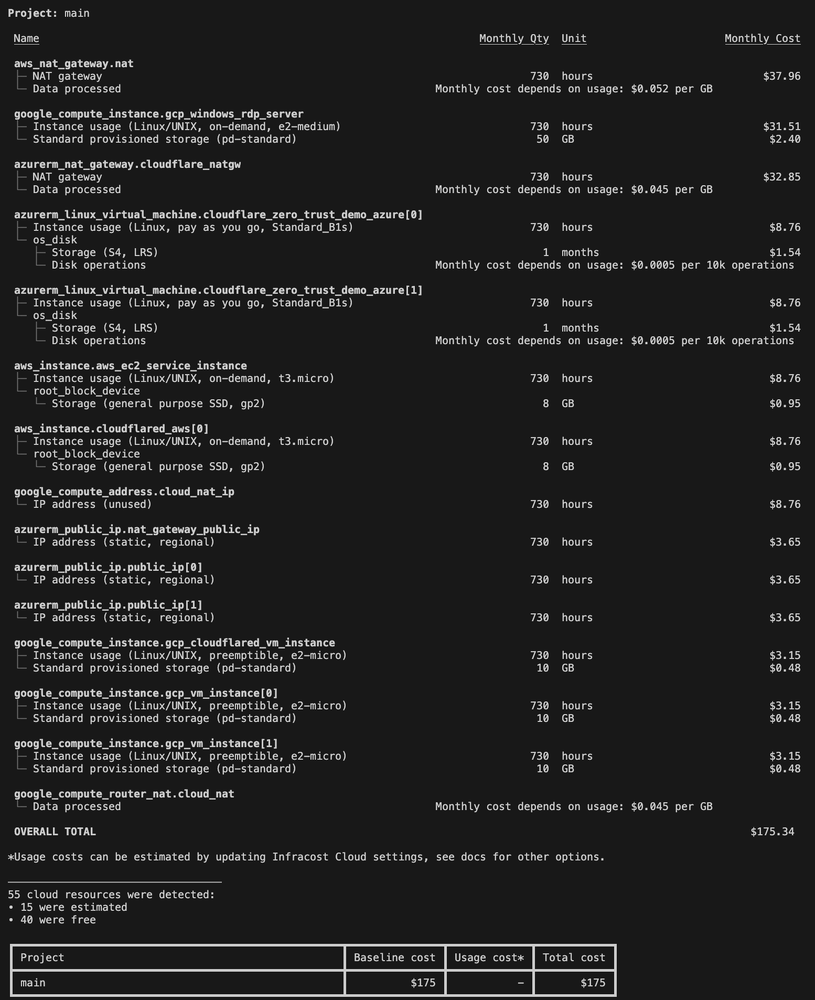
N.B.: the cost of the windows Server 2016 Datacenter is not included above (working on this issue)
The cost breakdown reveals some interesting insights.
Major Cost Drivers:
1. AWS NAT Gateway: $37.96/month (18% of total cost)
- Required for private subnet internet access
- Fixed monthly charge regardless of usage
- Alternative: NAT instances for cost optimization
2. GCP Windows RDP Server: $31.51/month (15% of total cost)
- Includes compute instance + Windows licensing
- Windows Server 2016 Datacenter licensing: $33.58/month additional
- Combined Windows costs: $65.09/month (31% of total)
3. Azure NAT Gateway: $32.85/month (16% of total cost)
- Similar cost structure to AWS
- Demonstrates consistency in NAT Gateway pricing across providers
Optimized Instances:
- Multiple small compute instances (e2-micro, t3.micro): $8.76 each
- Storage costs remain minimal: <$2/month per instance
- Network transfer costs are negligible due to low demo traffic
Multi-Cloud Cost Comparison
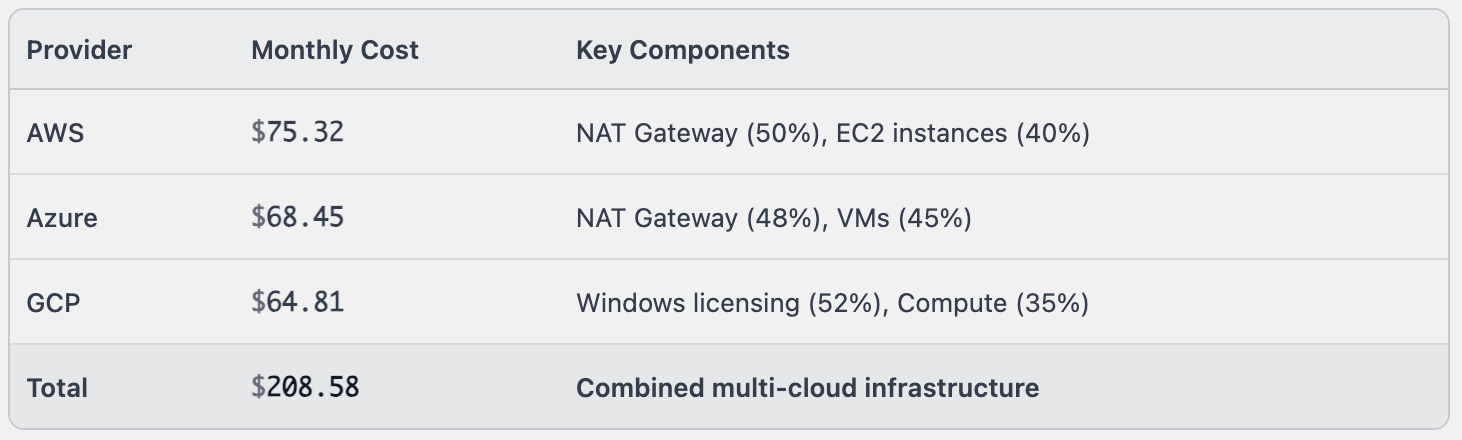
Key Insight: NAT Gateways represent the highest per-resource cost across all providers, highlighting the importance of network architecture decisions in multi-cloud deployments.
Conclusion
These four use cases demonstrate why Cloudflare’s approach to Zero Trust represents more than just feature parity with traditional solutions—it’s a fundamental reimagining of how secure access should work.
Traditional enterprise security stacks require separate tools for identity management, VPN access, privileged access management, session recording, and audit logging. Each tool adds complexity, integration challenges, and potential security gaps.
Cloudflare consolidates this entire stack into a unified platform where the same identity policies, the same audit trails, and the same security controls apply whether users are accessing SaaS applications, internal web services, SSH servers, or browser-based terminals.
The result isn’t just better security—it’s simpler operations, lower costs, and genuinely better user experience. Developers spend less time fighting access tools and more time building products.
Outputs:
| |
Lessons Learned
Start simple, scale complexity gradually - Beginning with basic SSH access before advancing to browser-rendered terminals and RDP proved essential for troubleshooting and understanding the platform
Network architecture drives costs - NAT Gateways represented 30%+ of total infrastructure costs across all providers, making network design optimization crucial for production deployments
Identity provider integration is foundational - Investing time in proper SCIM configuration and group mapping early prevents significant rework later as policies become more complex
Documentation beats automation - While Infrastructure as Code enables reproducibility, clear documentation of policy logic and troubleshooting steps proved more valuable for team collaboration
Multi-cloud consistency requires discipline - Each cloud provider’s unique networking patterns and service names created maintenance overhead that requires careful module design and naming conventions
Technical remaining Challenges
- I am still facing the same issue as described in part 2. I have posted it on the Cloudflare Community here .
- Some issues still arise when dealing specifically with Azure resources (ressources not deleted, connection reset, etc…)
- I still have not found a way to retrieve the WARP IP addresses to use them in my outputs.tf ssh command.
Roadmap 📖
- Use the Entra ID integration
- Use case for WARP Connector (Site-to-Site, Site-to-Internet…) link to the documentation
- Observability use case with Datadog
What’s Next?
👉 The code has been released on Github, check it out: https://github.com/macharpe
I am sure the code can be refactored in a better way and enhanced to simplify it. I have posted it but I intend to maintain it (it is work in progress)
This isn’t just a demo-it’s a blueprint for modern security. Stay tuned to transform your Zero Trust strategy from concept to reality. 🔒
Let me know if you’d like further refinements or if you have specific areas you want to expand!