Disclaimer: This article reflects my personal views and experiences and does not represent the official stance of Cloudflare. It is not an official Cloudflare tutorial or documentation. The project discussed is a personal initiative created independently.
Introduction
As a Solutions Engineer at Cloudflare, I frequently work with customers exploring Zero Trust security solutions. While Cloudflare offers a 50-user free tier perfect for initial testing, I identified a gap: there was no simple, scalable way to quickly demonstrate the full power of Cloudflare’s Zero Trust platform in a controlled demo environment.
This led me to create an automated demo infrastructure using Terraform that showcases Cloudflare’s capabilities while being easy to deploy, customize, and tear down. In this multi-part series, I’ll walk you through how I built this solution.
Why This Matters
The Challenge
Sales Engineers and Solutions Architects often need to:
- Quickly spin up demo environments
- Showcase multiple security features simultaneously
- Customize demos for specific customer use cases
- Manage costs while maintaining realistic scenarios
The Solution
A fully automated, Infrastructure-as-Code approach that:
- Deploys in minutes, not hours
- Scales from 10 to 10,000 users
- Demonstrates real-world Zero Trust architectures
- Costs pennies per demo (with automatic cleanup)
Genesis of the Project
This project emerged from a common frustration: traditional demo setups were:
- Time-consuming to configure
- Difficult to reproduce consistently
- Hard to customize for specific scenarios
- Expensive to maintain
By leveraging Terraform and Cloudflare’s APIs, I created a solution that addresses all these pain points.
Architecture

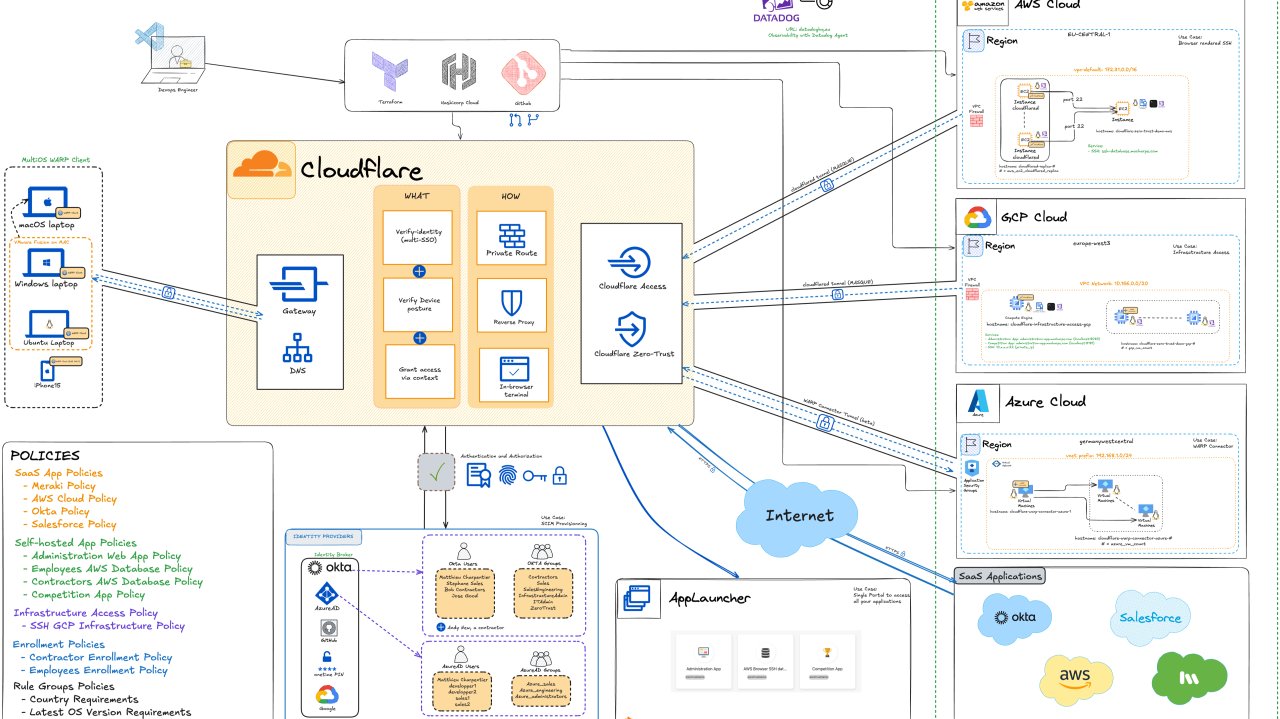
The demo environment consists of several key components working together:
- Cloudflare Zero Trust Core: Gateway, Access, WARP client management
- Identity Integration: Automated user provisioning with various IdPs
- Application Layer: Sample web applications protected by Cloudflare Access
- Monitoring & Analytics: Built-in logging and analytics dashboards
- Infrastructure as Code: Complete Terraform configuration for reproducibility
Requirements
Before getting started, you’ll need:
- A Cloudflare account (Free tier works, but paid features shown in advanced demos)
- Terraform installed (v1.0+)
- Basic understanding of Zero Trust concepts
- API tokens with appropriate permissions
- (Optional) AWS, GCP, or Azure account for application hosting
Key Components
1. Terraform Modules
The project is organized into reusable Terraform modules:
2. User Management
Automated creation of:
- Demo users with varied attributes
- Group assignments
- WARP device enrollments
- Authentication methods
3. Application Protection
Pre-configured examples for:
- SaaS application protection
- Self-hosted application access
- SSH and RDP access
- Browser isolation scenarios
4. Security Policies
Demonstrates:
- DNS filtering
- HTTP/S inspection
- Data Loss Prevention (DLP)
- Browser Isolation policies
- Device posture checks
Security Features and Benefits
The demo environment showcases these key security capabilities:
| Feature | Advantage | Business Benefit |
|---|---|---|
| SSH with Access for Infrastructure | Secure, policy-driven SSH access to critical non-web applications; eliminates static key risks via short-lived certificates and granular access controls | Reduces attack surface, improves compliance, and simplifies SSH credential management; enables secure remote work and faster incident response |
| Enforce MFA to access Applications | Enforces multi-factor authentication (MFA) for sensitive apps, supporting various authentication methods (biometrics, OTP, etc.) | Strengthens access security, reduces risk of unauthorized access, and helps meet regulatory compliance requirements |
| SCIM provisioning (groups and users) | Automates user and group lifecycle management, syncing identities between IdP and Cloudflare | Minimizes manual errors, accelerates onboarding/offboarding, and reduces operational overhead |
| Browser-rendered terminal | Enables SSH access via browser without client software or complex configuration | Enhances user productivity, simplifies IT support, and supports secure remote work |
| AppLauncher | Central dashboard to access all entitled applications in one place | Streamlines user experience, reduces login fatigue, and increases productivity |
| Device Posture | Continuously verifies device health and compliance before granting access (core Zero Trust principle) | Reduces risk from compromised or non-compliant devices, enforces security policies dynamically |
| Secure Access to SaaS applications | Applies granular, context-aware security policies to SaaS and cloud apps | Protects sensitive data, prevents lateral movement, and simplifies SaaS access management |
| SSO Integration (Identity Broker) | Seamlessly integrates with identity providers (IdP) for Single Sign-On across all resources | Improves user convenience, centralizes authentication, and reduces password-related risks |
| SSH Auditability | Logs every SSH command and session for full visibility and traceability | Enables compliance auditing, accelerates incident investigations, and supports regulatory needs |
| Secure Web Gateway (Network) | Applies network-layer security policies to control access to websites and non-HTTP apps | Blocks malicious sites, enforces acceptable use, and reduces risk of data exfiltration |
| Tunnel Availability and failover | Ensures continuous, resilient access with automatic failover for secure tunnels | Maximizes uptime, supports business continuity, and reduces risk of service disruption |
| Terraforming the project | Infrastructure-as-Code (IaC) enables automated, consistent, and repeatable deployment of Cloudflare Zero Trust resources and policies. | Reduces manual errors, accelerates provisioning, supports version control and auditability, and simplifies scaling and rollback of security configurations. |
Unique Value
What makes this demo environment special:
- Speed: Deploy complete environments in < 5 minutes
- Flexibility: Easily customize for different industries and use cases
- Realistic: Simulates real-world scenarios with authentic traffic patterns
- Cost-Effective: Automatic cleanup prevents unnecessary charges
- Educational: Well-documented code helps teams learn Terraform and Zero Trust
Statistics on the code
The project has grown significantly:
- 1,200+ lines of Terraform code
- 15+ reusable modules
- 50+ configurable variables
- Supports 3 major cloud providers (AWS, GCP, Azure)
- Demo deployment time: < 5 minutes
- Teardown time: < 2 minutes
Some Technical Limitations
While powerful, the demo has some constraints:
- API Rate Limits: Bulk operations may hit Cloudflare API limits
- User Limits: Free tier supports up to 50 users (paid plans for larger demos)
- IdP Integration: Some IdP features require manual configuration
- Application Hosting: Sample apps need to be hosted separately
- Realistic Traffic: Doesn’t simulate actual user behavior patterns
What’s Next
In Part 2, I’ll provide a detailed walkthrough of:
- Setting up your Cloudflare account and API tokens
- Configuring the Terraform backend
- Deploying your first demo environment
- Customizing for specific scenarios
In Part 3, we’ll explore:
- Advanced configurations
- Multi-tenant demos
- Custom application integration
- Monitoring and analytics setup
Want to try it yourself?
The complete code is available on my GitHub: https://github.com/macharpe
Questions or suggestions?
Feel free to reach out via email or connect on LinkedIn . I’m always looking to improve this project and help others build better demos!
This is Part 1 of a 3-part series on building scalable Zero Trust demo environments.