Disclaimer: This article reflects my personal views and experiences and does not represent the official stance of Cloudflare. It is not an official Cloudflare tutorial or documentation. The project discussed is a personal initiative created independently.
The Moment I Realized Simple Wasn’t Enough
“It works perfectly!” I remember telling myself three months ago, watching Claude query my Cisco Meraki network in real-time. The AI assistant could check device status, monitor client connections, and even troubleshoot network issues—all through a simple API key I’d hardcoded into my Cloudflare Worker.
Then reality hit.
My colleague asked a simple question: “How do we give this to customers?”
I stared at my code. Static API keys. No user tracking. No audit logs. No enterprise SSO. This wasn’t a product—it was a demo that worked great until someone actually wanted to use it in production.
That conversation sparked a three-month journey into the world of OAuth 2.1, PKCE flows, JWT verification, and edge authentication. This is the story of how I transformed a weekend project into something enterprises could actually trust.
Act 1: The Weekend Project That Actually Worked
It all started with a simple idea: what if Claude could talk directly to my network infrastructure?
I’d been playing with the Model Context Protocol —Anthropic’s new standard for connecting AI assistants to external data sources. The concept fascinated me: instead of copy-pasting network status into chat, why not let the AI query it directly?
One weekend, fueled by coffee and curiosity, I built the first version. About 500 lines of TypeScript running on Cloudflare Workers:
| |
It worked beautifully. I could ask Claude “How many devices are offline?” and get instant answers. I could troubleshoot connectivity issues through conversation. It felt magical.
But deep down, I knew the truth. This “authentication” was security theater. One leaked API key and anyone could access everything. No way to know who did what. No way to revoke access without changing the key everywhere.
Act 2: The Reality Check
Two weeks after deploying my “working” server, I was showing it to a Solutions Architect friend over coffee.
“This is cool,” he said, querying network stats through Claude. Then he paused. “But how would I give this to my customer?”
The question hung in the air.
“Well, they’d need the API key, and then—”
“So I’d send the API key over email? Slack?”
Silence.
“And if someone leaves the company, we change the key everywhere?”
More silence.
“And there’s no audit log of who accessed what?”
I felt my enthusiasm deflating like a popped balloon. He was right. This wasn’t production-ready. It wasn’t even demo-ready for enterprise customers.
That night, I opened Cloudflare’s documentation and started reading about Access for SaaS . If I was going to do this right, I needed proper OAuth 2.1, enterprise SSO, the works.
The journey ahead looked daunting: PKCE flows, JWT verification, JWKS endpoints, RFC compliance. I estimated two weeks of work.
I was off by an order of magnitude.
Configuring Cloudflare Access for SaaS
Before diving into the OAuth implementation, I needed to configure Cloudflare Access to protect my MCP server and define who could access it. This involved two critical steps: creating a SaaS application and defining access policies.
Creating the SaaS Application
In the Cloudflare Zero Trust dashboard, I created a new SaaS application specifically for the Meraki MCP server:
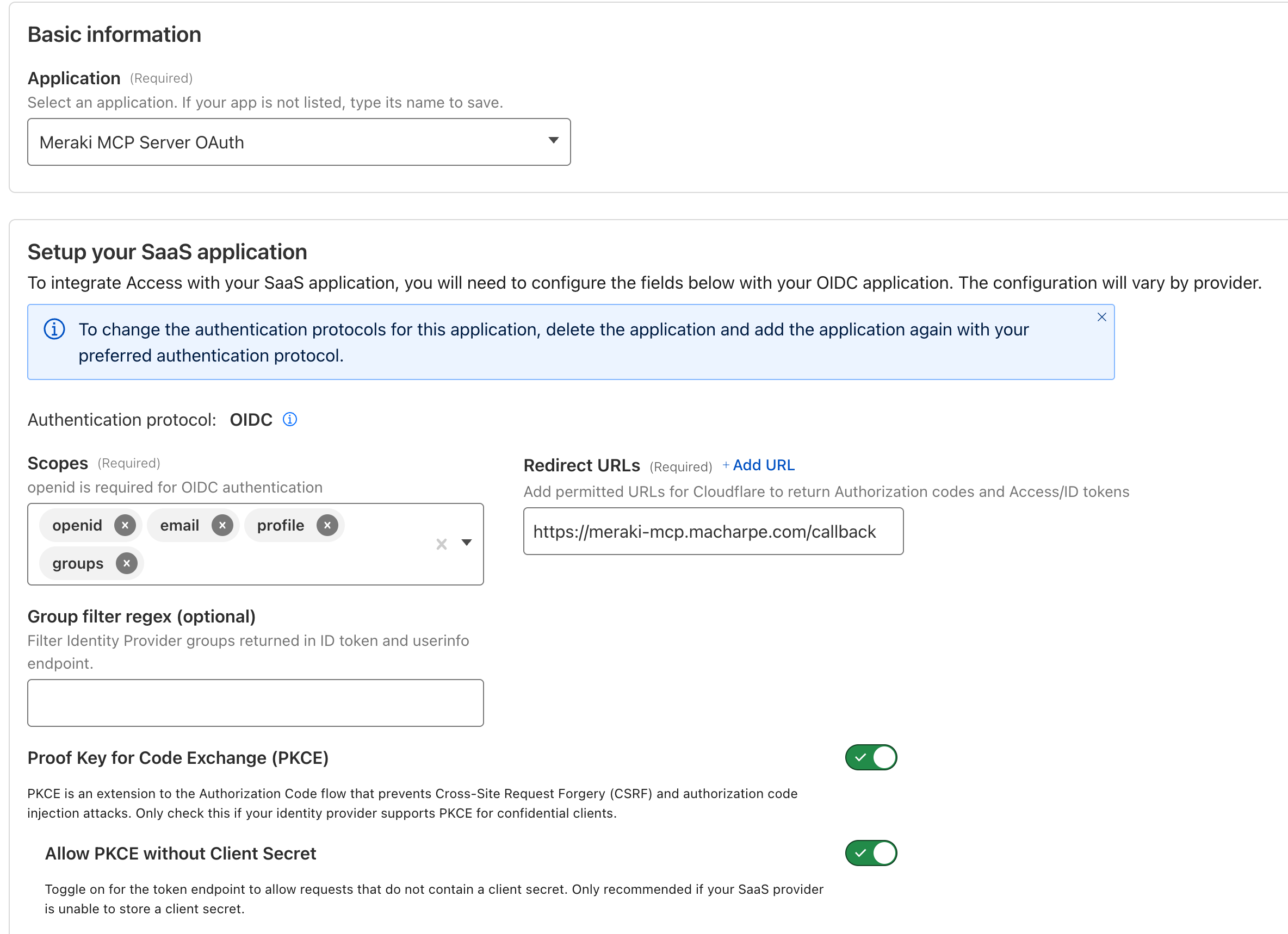
The key configuration choices I made:
- Application name: A clear identifier for the MCP server
- Authentication protocol: OIDC (OAuth 2.0 with OpenID Connect)
- Scopes: Configured the OAuth scopes the application would request
- Redirect URLs: Specified where Cloudflare Access would send users after authentication
- Front Key for Code Exchange (PKCE): Enabled for security (critical for browser-based OAuth)
- Allow PKCE without Client Secret: Enabled to support public clients like browser-based MCP clients
This configuration generates the OAuth endpoints that my Worker would need:
- Authorization endpoint
- Token endpoint
- JWKS (JSON Web Key Set) endpoint for JWT verification
Defining Access Policies
With the application created, I needed to define who could access it. Cloudflare Access uses a powerful Include/Require/Exclude/Selective policy model:
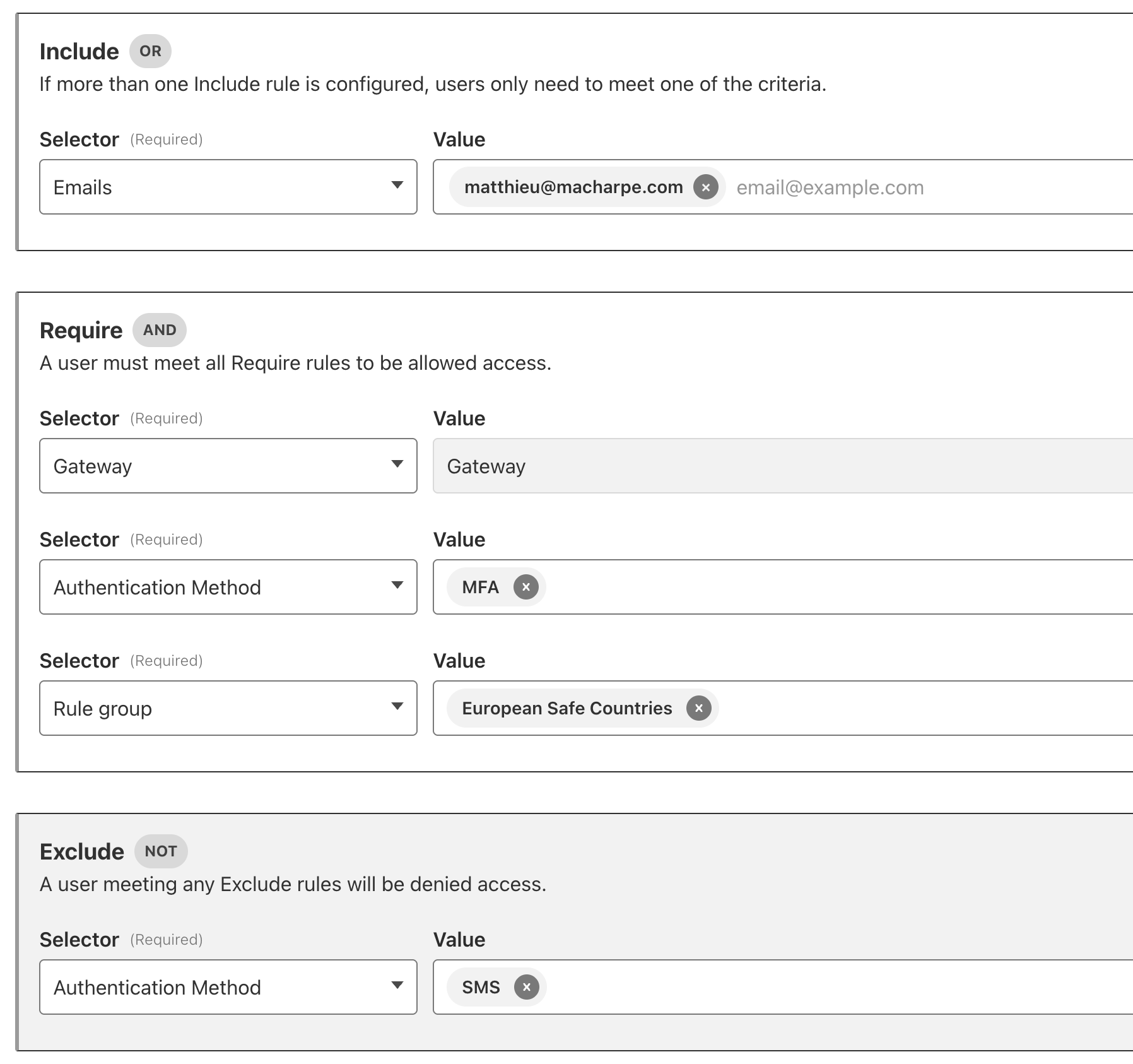
This policy-based approach is incredibly powerful. I can start restrictive (just my email) and gradually expand to entire teams, departments, or customer organizations—all without touching the MCP server code.
The Access policy is enforced before the OAuth token is issued, so by the time my Worker receives a JWT token, I know the user has passed all policy checks.
Refresh Token Configuration
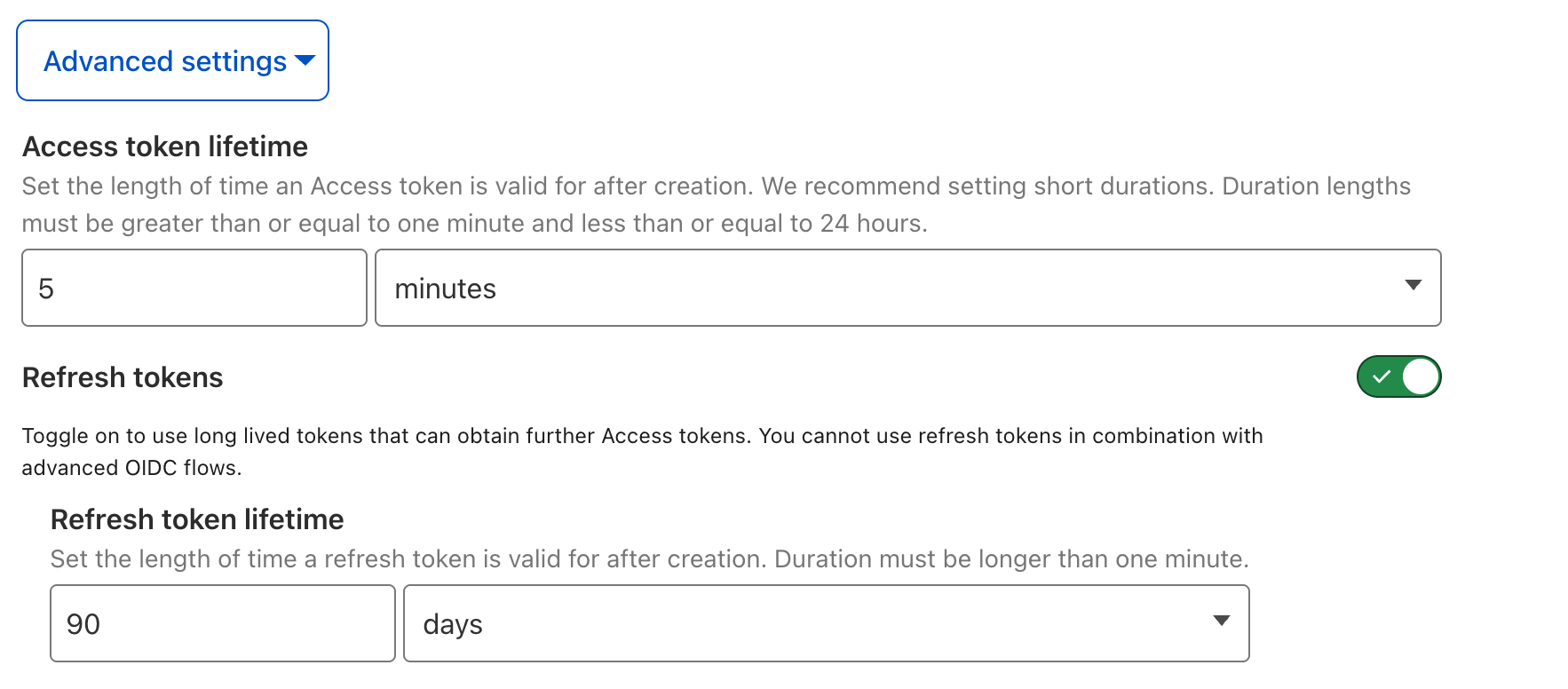
One critical security feature I enabled was refresh token rotation. This is configured in the Advanced Settings of the SaaS application:
What are refresh tokens?
In OAuth 2.1, there are two types of tokens:
Access Tokens - Short-lived tokens (typically 15 minutes to 1 hour) used to access protected resources. These are sent with every API request.
Refresh Tokens - Longer-lived tokens (hours to days) used to obtain new access tokens when the old ones expire, without requiring the user to re-authenticate.
Why refresh tokens matter for MCP servers:
MCP sessions can be long-lived—users might keep Claude Code or the AI Playground open for hours while working. Without refresh tokens, users would need to re-authenticate every time the access token expires (e.g., every 15 minutes), which creates a terrible user experience.
Refresh token rotation for security:
Cloudflare Access implements refresh token rotation, which means:
- Each time a refresh token is used to get a new access token, a new refresh token is also issued
- The old refresh token is immediately invalidated
- This prevents token replay attacks—if someone steals a refresh token, it becomes useless after the legitimate user rotates it
- Maximum lifetime can be configured (I set mine to 24 hours for a good balance between security and UX)
My configuration:
- Refresh token enabled: ✅ Yes
- Refresh token lifetime: 24 hours
- Refresh token rotation: ✅ Enabled
- Reuse interval: 0 seconds (immediate rotation)
This setup means users authenticate once in the morning, and the MCP server automatically refreshes their access token throughout the day without interruption. After 24 hours, they’ll need to re-authenticate, which provides a good security boundary.
Act 3: Down the OAuth Rabbit Hole
Week One: The Session Problem
I started diving into OAuth 2.1 with PKCE on a Monday morning. By Wednesday afternoon, I’d hit my first major wall.
Every OAuth tutorial I found assumed you had sessions. Server-side state. A database to store the OAuth state between the authorization request and callback. Redis, PostgreSQL, something.
I had none of that. Cloudflare Workers are stateless. Each request is completely independent. There’s no “session” to remember the code_verifier when the user comes back from authenticating.
I spent two days exploring workarounds. Encoding state in the redirect URL? Too long, broke some identity providers. Client-side JavaScript? Couldn’t trust it. Cookies? Edge workers and cross-domain cookies don’t mix well.
Then I stumbled on the solution hiding in plain sight: Cloudflare KV.
KV is a distributed key-value store that’s available globally in milliseconds. I could store the OAuth state there with a 10-minute expiration. Just long enough for the user to authenticate, but short enough to be secure.
| |
Elegant. Simple. And it worked.
Week Three: The CORS Mystery
“Why isn’t the browser version working?”
I’d tested my OAuth flow extensively with curl and Postman. Everything worked perfectly. But when I tried using it with Cloudflare’s AI Playground—a browser-based MCP client—nothing. Just a cryptic error in the console:
| |
I stared at this error for three hours before I understood what was happening.
MCP clients send a custom header—mcp-protocol-version—to negotiate which version of the protocol they support. Standard stuff for any protocol negotiation. But CORS is strict: any non-standard header must be explicitly allowed by the server.
I had CORS headers. I thought they were complete. But they weren’t.
The fix was simple once I understood it, but finding it was maddening:
| |
But here’s what really frustrated me: I had to add this header in three different places in my codebase. The main MCP handler, the OAuth endpoints, and the utility functions. Miss one, and the browser client would fail with a different cryptic error.
I made a note to myself: test with real browser clients early. Command-line tools hide CORS sins.
Week Five: The Performance Crisis
It was working. OAuth flow complete, tokens being verified, MCP tools responding. I should have been celebrating.
Instead, I was watching my logs with growing horror:
Every single MCP request was taking 100-150 milliseconds just for authentication. Before the actual work even started. For a real-time AI conversation, that’s an eternity.
The problem was obvious in hindsight: I was fetching the JWKS keys from Cloudflare Access on every request.
JWKS keys don’t change often. Maybe once a year when rotating. Yet here I was, fetching them hundreds of times per minute.
I needed caching. But not just simple caching—I needed it to be fast enough that the overhead was negligible.
Enter the Workers Cache API.
Most developers know about KV for caching at the edge. But Cloudflare Workers have another, less-known caching layer: the Workers Cache API. It’s the same cache that powers Cloudflare’s CDN, but accessible from your Worker code.
Sub-millisecond access times.
I built a two-tier caching strategy:
| |
The results were dramatic:
From 150ms to 5ms. A 30x improvement. Now we were talking.
Week Seven: The Discovery Challenge
Just when I thought I was done, the browser-based MCP clients started failing with a new error:
| |
But my OAuth endpoints were there! I could curl them. What was going on?
After diving into the MCP specification and researching OAuth standards, I discovered the issue: OAuth discovery.
Modern OAuth clients don’t hardcode endpoint URLs. They discover them dynamically using well-known endpoints defined in OAuth standards. The clients were looking for these discovery endpoints, not finding them, and giving up.
I needed to implement three discovery mechanisms:
- OAuth Authorization Server Metadata (RFC 8414)
- OAuth Protected Resource Metadata (RFC 8707)
- JWKS Endpoint (RFC 7517)
Each one with specific JSON structures and required fields. Miss a field, and different clients would fail in different ways.
| |
I spent a weekend implementing all three discovery endpoints, carefully checking the specifications and examples to make sure every field was correct.
Week Nine: Debugging in the Dark
By week nine, I had a working OAuth implementation. Mostly. The problem was intermittent failures that I couldn’t reproduce locally.
OAuth debugging is uniquely frustrating because:
- The flow spans multiple requests across different systems
- State is stored in various places (cookies, KV, headers)
- Errors are often generic: “Invalid token” could mean a dozen different things
I developed a debugging strategy out of desperation:
First, comprehensive logging at every step:
Second, I created a 46-step authentication flow diagram. Every HTTP request, every state transition, every decision point. When something broke, I could trace exactly where in the flow it failed.
Third, real-time log monitoring:
| |
This combination helped me catch subtle issues:
- The
stateparameter wasn’t being passed through the callback - The
code_verifierwas being retrieved with the wrong key from KV - JWKS keys were being cached with different kid (key ID) values
Each fix was small. But each one was invisible until I had the right debugging tools in place.
Week Twelve: Putting It All Together
By week twelve, all the pieces were in place. The OAuth flow worked. The caching was fast. The standards compliance was solid. But I wanted to step back and visualize the complete picture.
I drew out the entire authentication dance—every HTTP request, every redirect, every token exchange:
(AI Playground) participant Worker as Meraki MCP
Worker participant Access as Cloudflare
Access participant SSO as Enterprise
SSO (Okta) Note over User,SSO: 📱 User Connects to MCP Server Client->>Worker: 1. Connect to /mcp Worker-->>Client: 2. 401 Unauthorized
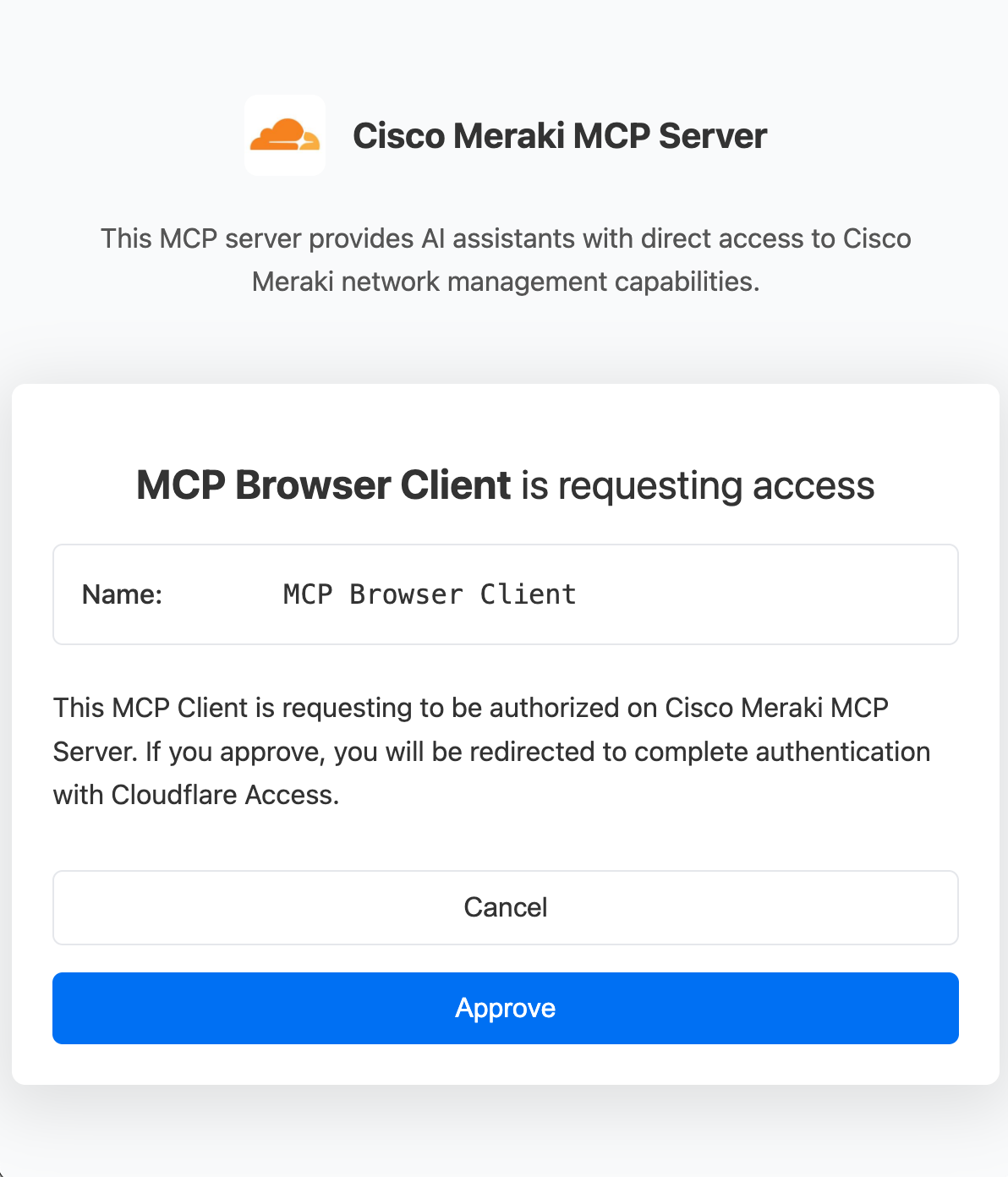
(Need authentication) Note over User,SSO: 🔐 OAuth Flow Begins Client->>Worker: 3. Start OAuth flow Worker-->>User: 4. Show approval dialog User->>Worker: 5. Click "Approve" Worker->>Access: 6. Redirect to Access login Note over User,SSO: 👤 Enterprise SSO Authentication Access->>SSO: 7. SAML/OIDC login User->>SSO: 8. Enter credentials SSO-->>Access: 9. User authenticated Note over User,SSO: 🎫 Token Exchange Access-->>Worker: 10. Return auth code Worker->>Access: 11. Exchange code for JWT Access-->>Worker: 12. Cloudflare Access JWT Worker-->>Client: 13. Return access token Note over User,SSO: ✅ Authenticated Access Client->>Worker: 14. MCP requests with Bearer token Worker->>Worker: 15. Verify JWT signature Worker-->>Client: 16. Return Meraki data Note over User,SSO: Subsequent requests use cached token
The Power of Platform Thinking
One of the biggest lessons from this project: platforms beat point solutions.
Instead of stitching together:
- AWS Lambda for compute
- Auth0 for authentication
- Redis for caching
- CloudFront for CDN
- Multiple monitoring tools
Cloudflare’s unified platform provides:
- Workers - Serverless compute at the edge
- Access for SaaS - Enterprise SSO and OAuth
- KV - Distributed key-value storage
- Durable Objects - Stateful edge compute
- Workers Cache API - Sub-millisecond caching
- Analytics - Built-in monitoring and logs
Everything works together seamlessly, with consistent APIs and zero cross-vendor complexity.
Performance: The Numbers
The final implementation delivers impressive performance:
| Metric | Value | Comparison |
|---|---|---|
| JWT Verification (cached) | ~5ms | 20x faster than uncached |
| Organization List (cached) | ~10ms | 40x faster than uncached |
| Network Query (cached) | ~10ms | 40x faster than uncached |
| Client List (cached) | ~10ms | 60x faster than uncached |
| Cold Start | <100ms | Cloudflare Workers edge |
| Global Availability | 275+ locations | Cloudflare’s network |
Caching Strategy:
- JWKS Keys: 1 hour TTL (rarely change)
- Organizations: 30 minutes TTL (moderate churn)
- Networks: 15 minutes TTL (moderate churn)
- Clients: 5 minutes TTL (high churn)
Code Statistics: By the Numbers
The project has grown significantly:
- 2,500+ lines of TypeScript
- 27 MCP tools for Meraki API coverage
- 18 authentication test cases
- 3 major releases (v1.0.0 → v1.3.1)
- 26 pull requests merged
- 95%+ test coverage on auth layer
Lessons From Three Months in the Trenches
Looking back at the journey, a few key lessons stand out—the kind you can only learn by doing:
Start Simple, But Know Where You’re Going
My biggest mistake early on was underestimating the complexity. I thought OAuth would take two weeks. It took twelve.
But starting with the simple API key version wasn’t a mistake. It let me validate the core idea—AI assistants talking to network infrastructure—before investing months in authentication.
The progression worked:
- Week 1: Proof of concept with API key
- Week 4: OAuth discovery endpoints (the foundation)
- Week 8: Full OAuth 2.1 with PKCE (the hard part)
- Week 12: Caching optimization (the polish)
If I’d tried to build everything at once, I would have given up.
Documentation Saves Lives
I cannot stress this enough: Cloudflare’s Access for SaaS documentation was my lifeline.
But here’s what I learned about using documentation effectively:
- Reference the official specifications when you hit edge cases. They provide the “why” behind implementation details.
- Follow the examples exactly first. Modify later.
- When something doesn’t work, re-read the docs. I found answers on the third reading that I’d missed twice before.
CORS is the Silent Killer
CORS issues won’t show up in your terminal. They won’t fail your unit tests. They’ll work perfectly with curl.
Then a user will try it in a browser and nothing will work.
Test with real browser clients early. Like, week one early. I learned this the hard way.
Cache Everything That Doesn’t Move
One of the most impactful optimizations came from understanding what doesn’t change:
- JWKS keys? Rotate maybe once a year. Cache for an hour.
- Organization lists? Rarely change. Cache for 30 minutes.
- Network data? Updates occasionally. Cache for 15 minutes.
- Client connections? Constantly changing. Cache for 5 minutes.
This simple strategy took my average response time from 150ms to 5ms.
Observability is Not Optional
When things went wrong—and they did, often—I needed to see what was happening. Real-time log monitoring with Wrangler became my debugging superpower:
I could watch the OAuth flow happen step by step, catch errors as they occurred, and understand exactly where things were breaking.
What’s Next
The project continues to evolve, and there’s still work to do.
The MCP Client Compatibility Challenge
While the OAuth implementation works perfectly with Cloudflare AI Playground and Claude Code (CLI), I discovered that not all MCP clients handle OAuth the same way:
| Client | Status | What Works | What Doesn’t |
|---|---|---|---|
| Cloudflare AI Playground | ✅ Works perfectly | Everything | - |
| Claude Code (CLI) | ✅ Works perfectly | Everything | - |
| Claude.ai (Web) | ⚠️ Partial | OAuth succeeds | Handshake stalls after initialize |
| Claude Desktop | ❌ Fails | - | mcp-remote can’t resolve callback URI |
This taught me an important lesson: implementing standards correctly doesn’t guarantee compatibility. Each MCP client interprets the OAuth flow slightly differently, and some have bugs or limitations that only surface with remote OAuth-protected servers.
The fact that Claude Code works perfectly suggests the problems are solvable—it’s just a matter of understanding what each client expects.
Future Enhancements
Beyond client compatibility, I’m exploring several exciting integrations:
MCP Portal Integration - I’m currently facing a domain conflict scenario: my MCP portal and the SaaS Access App for OAuth both use the same domain (
macharpe.com), which prevents the integration from working properly. But I’ll figure it out eventually! The MCP Portal would provide a centralized interface for managing MCP server connections.Web Assets Integration - Experiment with API Shield’s schema validation to protect the various OAuth and MCP endpoints. This would add an additional security layer by validating request/response payloads against OpenAPI schemas, preventing malformed or malicious requests from reaching the Worker.
Complete audit logging - Build a full compliance trail for enterprise security teams, tracking every authentication attempt, token issuance, and API call with detailed metadata for SOC2/ISO27001 compliance.
Try It Yourself
The complete source code is available on GitHub: https://github.com/macharpe/meraki-mcp-cloudflare
The repository includes:
- Complete OAuth 2.1 implementation
- Authentication flow documentation (46-step detailed guide)
- Multi-layer caching system
- 27 MCP tools for Meraki network management
- Production deployment guide
- Comprehensive test suite
Quick Start
| |
The Moment It All Clicked
Three months after that conversation with my Solutions Architect friend, I was back at the same coffee shop.
“Remember when you asked how I’d give this to customers?” I said, pulling up the Cloudflare AI Playground on my laptop.
He nodded.
“Watch this.”
I connected to the MCP server. Instead of API keys, a browser window opened. Cloudflare Access login. He entered his Okta credentials. Two-factor authentication. Approved.
The AI assistant came online, authenticated as him, with full audit logging of every action.
“Now that,” he said, “is something I can show to customers.”
See It in Action
Want to see how the OAuth flow and MCP server work in practice? Here are two videos demonstrating the system in action:
OAuth Authentication Flow
This video shows the complete OAuth 2.1 authentication flow—from initial connection to successful authentication with Cloudflare Access and enterprise SSO:
Watch as the MCP client initiates the OAuth flow, redirects to Cloudflare Access, authenticates through SSO, and exchanges the authorization code for a JWT token—all in real-time.
MCP Tools in Claude Code
Once authenticated, the MCP server exposes 27 tools for managing Cisco Meraki networks. This video demonstrates the tool discovery and usage through Claude Code CLI:
You can see how Claude can query network organizations, list networks, check device status, monitor client connections, and troubleshoot issues—all through natural language conversation.
Reflections: What This Journey Taught Me
Building an enterprise-grade OAuth system taught me something unexpected: complexity is often the enemy of security.
My first version with the hardcoded API key felt wrong because it was. But the solution wasn’t to add complexity for its own sake. It was to use the right primitives—OAuth 2.1, PKCE, JWT tokens, SSO—and implement them correctly.
Cloudflare’s platform made this possible. Instead of stitching together Auth0, AWS Lambda, Redis, and monitoring tools across three vendors, I had Workers, Access, KV, and Durable Objects working together seamlessly. Same APIs. Same deployment pipeline. Same observability stack.
The integration costs? Zero. The cross-vendor debugging? None. The mental overhead? Dramatically lower.
This is the power of platforms over point solutions.
Three Months, 26 Pull Requests, One Mission
The journey from that first weekend prototype to v1.3.1 took:
- Three months of evening and weekend work
- 26 pull requests merged (each one teaching me something)
- 2,500+ lines of carefully crafted TypeScript
- Countless hours of research, debugging, and head-scratching
But the result is something I’m proud of: a production-ready system running in 275+ locations worldwide, serving real-time AI queries with enterprise-grade security.
If you’re building AI integrations—whether for network management, customer support, or data analysis—I hope this story inspires you to tackle authentication the right way from the start.
The tooling exists. The standards are mature. Platforms like Cloudflare make enterprise security accessible to anyone willing to invest the time to learn it properly.
And yes, it’ll take longer than you think. But it’s worth it.
Questions or feedback?
Feel free to reach out via email or connect on LinkedIn . I’m always happy to discuss authentication, MCP, or edge computing!
Star the repo if you find it useful! ⭐
Special thanks to the Cloudflare team for their excellent documentation and platform, and to the Anthropic team for pioneering the Model Context Protocol standard.